Development Status
- 5 - Production/Stable
Intended Audience
- Developers
- Information Technology
License
- OSI Approved :: MIT License
Operating System
- OS Independent
Programming Language
- Python :: 3
- Python :: 3.9
- Python :: 3.10
- Python :: 3.11
- Python :: 3.12
- Python :: 3.13
- Python :: 3 :: Only
- Python :: Implementation :: CPython
- Python :: Implementation :: PyPy
Topic
- Software Development :: Code Generators
- Software Development :: Libraries
- Software Development :: Libraries :: Python Modules
- Text Processing
- Text Processing :: Markup :: HTML
- Text Processing :: Markup :: LaTeX
- Text Processing :: Markup :: Markdown
- Text Processing :: Markup :: reStructuredText
Typing
- Typed
Summary
pytablewriter is a Python library to write a table in various formats: AsciiDoc / CSV / Elasticsearch / HTML / JavaScript / JSON / LaTeX / LDJSON / LTSV / Markdown / MediaWiki / NumPy / Excel / Pandas / Python / reStructuredText / SQLite / TOML / TSV / YAML.







Features
- Write a table in various formats:
- Text formats:
CSV / Tab-separated values (TSV) / Space-separated values (SSV)
HTML / CSS
JSON / Line-delimited JSON(LDJSON)
LaTeX: tabular/array environment
Markdown: CommonMark / GitHub Flavored Markdown (GFM) / kramdown
reStructuredText: Grid Tables/Simple Tables/CSV Table
- Source code (definition of a variable that represents tabular data)
JavaScript / NumPy (numpy.array) / Pandas (pandas.DataFrame) / Python
Unicode
- Binary file formats:
Microsoft Excel TM (.xlsx/.xls file format)
pandas.DataFrame pickle file
SQLite database
- Application-specific formats:
- Automatic table cell formatting:
Alignment
Padding
Decimal places of numbers
- Customize table cell styles:
Text/Background color
Text alignment
Font size/weight
Thousand separator for numbers: e.g. 1,000/1 000
- Configure output:
Write a table to a stream such as a file/standard-output/string-buffer/Jupyter-Notebook
Get rendered tabular text
- Data sources:
nested list
CSV
etc.
Multibyte character support
ANSI color support
Installation
Installation: pip
pip install pytablewriter
Some of the formats require additional dependency packages, you can install these packages as follows:
Installation example |
Remark |
|---|---|
pip install pytablewriter[es] |
Elasticsearch |
pip install pytablewriter[excel] |
Excel |
pip install pytablewriter[html] |
HTML |
pip install pytablewriter[sqlite] |
SQLite database |
pip install pytablewriter[toml] |
TOML |
pip install pytablewriter[theme] |
pytablewriter theme plugins |
pip install pytablewriter[all] |
Install all of the optional dependencies |
Installation: conda
conda install -c conda-forge pytablewriter
Installation: apt
sudo add-apt-repository ppa:thombashi/ppa
sudo apt update
sudo apt install python3-pytablewriter
Examples
Write tables
Write a Markdown table
- Sample Code:
from pytablewriter import MarkdownTableWriter def main(): writer = MarkdownTableWriter( table_name="example_table", headers=["int", "float", "str", "bool", "mix", "time"], value_matrix=[ [0, 0.1, "hoge", True, 0, "2017-01-01 03:04:05+0900"], [2, "-2.23", "foo", False, None, "2017-12-23 45:01:23+0900"], [3, 0, "bar", "true", "inf", "2017-03-03 33:44:55+0900"], [-10, -9.9, "", "FALSE", "nan", "2017-01-01 00:00:00+0900"], ], ) writer.write_table() if __name__ == "__main__": main()- Output:
# example_table |int|float|str |bool | mix | time | |--:|----:|----|-----|-------:|------------------------| | 0| 0.10|hoge|True | 0|2017-01-01 03:04:05+0900| | 2|-2.23|foo |False| |2017-12-23 12:34:51+0900| | 3| 0.00|bar |True |Infinity|2017-03-03 22:44:55+0900| |-10|-9.90| |False| NaN|2017-01-01 00:00:00+0900|- Rendering Result:
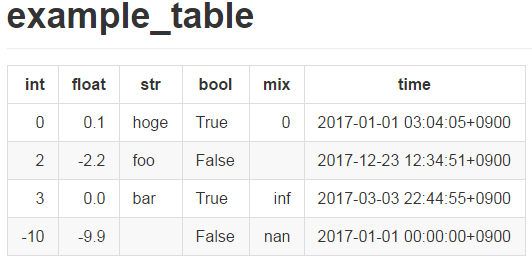
Rendered markdown at GitHub
Write a Markdown table with margins
- Sample Code:
from pytablewriter import MarkdownTableWriter def main(): writer = MarkdownTableWriter( table_name="write a table with margins", headers=["int", "float", "str", "bool", "mix", "time"], value_matrix=[ [0, 0.1, "hoge", True, 0, "2017-01-01 03:04:05+0900"], [2, "-2.23", "foo", False, None, "2017-12-23 45:01:23+0900"], [3, 0, "bar", "true", "inf", "2017-03-03 33:44:55+0900"], [-10, -9.9, "", "FALSE", "nan", "2017-01-01 00:00:00+0900"], ], margin=1 # add a whitespace for both sides of each cell ) writer.write_table() if __name__ == "__main__": main()- Output:
# write a table with margins
| int | float | str  | bool  |   mix    |           time           |
| --: | ----: | ---- | ----- | -------: | ------------------------ |
|   0 |  0.10 | hoge | True  |        0 | 2017-01-01 03:04:05+0900 |
|   2 | -2.23 | foo  | False |          | 2017-12-23 12:34:51+0900 |
|   3 |  0.00 | bar  | True  | Infinity | 2017-03-03 22:44:55+0900 |
| -10 | -9.90 |      | False |      NaN | 2017-01-01 00:00:00+0900 |
margin attribute can be available for all of the text format writer classes.
Write a GitHub Flavored Markdown (GFM) table
If you set flavor keyword argument of MarkdownTableWriter class to "github" or "gfm", the writer will output markdown tables with GitHub flavor. GFM can apply some additional styles to tables such as fg_color (text color).
- Sample Code:
from pytablewriter import MarkdownTableWriter
from pytablewriter.style import Style

writer = MarkdownTableWriter(
    column_styles=[
        Style(fg_color="red"),
        Style(fg_color="green", decoration_line="underline"),
    ],
    headers=["A", "B"],
    value_matrix=[
        ["abc", 1],
        ["efg", 2],
    ],
    margin=1,
    flavor="github",
    enable_ansi_escape=False,
)
writer.write_table()
Rendered results can be found at here
Apply styles to GFM table with programmatically
Applying style filters to GFM allows for more flexible style settings for cells. See also the example
Write a Markdown table to a stream or a file
Write a table to an Excel sheet
- Sample Code:
from pytablewriter import ExcelXlsxTableWriter def main(): writer = ExcelXlsxTableWriter() writer.table_name = "example" writer.headers = ["int", "float", "str", "bool", "mix", "time"] writer.value_matrix = [ [0, 0.1, "hoge", True, 0, "2017-01-01 03:04:05+0900"], [2, "-2.23", "foo", False, None, "2017-12-23 12:34:51+0900"], [3, 0, "bar", "true", "inf", "2017-03-03 22:44:55+0900"], [-10, -9.9, "", "FALSE", "nan", "2017-01-01 00:00:00+0900"], ] writer.dump("sample.xlsx") if __name__ == "__main__": main()- Output:
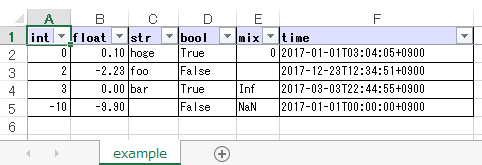
Output excel file (sample_single.xlsx)
Write a Unicode table
- Sample Code:
from pytablewriter import UnicodeTableWriter def main(): writer = UnicodeTableWriter( table_name="example_table", headers=["int", "float", "str", "bool", "mix", "time"], value_matrix=[ [0, 0.1, "hoge", True, 0, "2017-01-01 03:04:05+0900"], [2, "-2.23", "foo", False, None, "2017-12-23 45:01:23+0900"], [3, 0, "bar", "true", "inf", "2017-03-03 33:44:55+0900"], [-10, -9.9, "", "FALSE", "nan", "2017-01-01 00:00:00+0900"], ] ) writer.write_table() if __name__ == "__main__": main()- Output:
┌───┬─────┬────┬─────┬────────┬────────────────────────┐
│int│float│str │bool │  mix   │          time          │
├───┼─────┼────┼─────┼────────┼────────────────────────┤
│  0│ 0.10│hoge│True │       0│2017-01-01 03:04:05+0900│
├───┼─────┼────┼─────┼────────┼────────────────────────┤
│  2│-2.23│foo │False│        │2017-12-23 12:34:51+0900│
├───┼─────┼────┼─────┼────────┼────────────────────────┤
│  3│ 0.00│bar │True │Infinity│2017-03-03 22:44:55+0900│
├───┼─────┼────┼─────┼────────┼────────────────────────┤
│-10│-9.90│    │False│     NaN│2017-01-01 00:00:00+0900│
└───┴─────┴────┴─────┴────────┴────────────────────────┘
Write a table with JavaScript format (as a nested list variable definition)
- Sample Code:
import pytablewriter as ptw def main(): writer = ptw.JavaScriptTableWriter( table_name="js_variable", headers=["int", "float", "str", "bool", "mix", "time"], value_matrix=[ [0, 0.1, "hoge", True, 0, "2017-01-01 03:04:05+0900"], [2, "-2.23", "foo", False, None, "2017-12-23 45:01:23+0900"], [3, 0, "bar", "true", "inf", "2017-03-03 33:44:55+0900"], [-10, -9.9, "", "FALSE", "nan", "2017-01-01 00:00:00+0900"], ], ) writer.write_table() if __name__ == "__main__": main()- Output:
const js_variable = [
    ["int", "float", "str", "bool", "mix", "time"],
    [0, 0.1, "hoge", true, 0, "2017-01-01 03:04:05+0900"],
    [2, -2.23, "foo", false, null, "2017-12-23 45:01:23+0900"],
    [3, 0, "bar", true, Infinity, "2017-03-03 33:44:55+0900"],
    [-10, -9.9, "", "FALSE", NaN, "2017-01-01 00:00:00+0900"]
];
Write a Markdown table from pandas.DataFrame instance
from_dataframe method of writer classes will set up tabular data from pandas.DataFrame:
- Sample Code:
from textwrap import dedent import pandas as pd import io from pytablewriter import MarkdownTableWriter def main(): csv_data = io.StringIO(dedent("""\ "i","f","c","if","ifc","bool","inf","nan","mix_num","time" 1,1.10,"aa",1.0,"1",True,Infinity,NaN,1,"2017-01-01 00:00:00+09:00" 2,2.20,"bbb",2.2,"2.2",False,Infinity,NaN,Infinity,"2017-01-02 03:04:05+09:00" 3,3.33,"cccc",-3.0,"ccc",True,Infinity,NaN,NaN,"2017-01-01 00:00:00+09:00" """)) df = pd.read_csv(csv_data, sep=',') writer = MarkdownTableWriter(dataframe=df) writer.write_table() if __name__ == "__main__": main()- Output:
| i | f  | c  | if |ifc|bool |  inf   |nan|mix_num |          time           |
|--:|---:|----|---:|---|-----|--------|---|-------:|-------------------------|
|  1|1.10|aa  | 1.0|  1|True |Infinity|NaN|       1|2017-01-01 00:00:00+09:00|
|  2|2.20|bbb | 2.2|2.2|False|Infinity|NaN|Infinity|2017-01-02 03:04:05+09:00|
|  3|3.33|cccc|-3.0|ccc|True |Infinity|NaN|     NaN|2017-01-01 00:00:00+09:00|
Adding a column of the DataFrame index if you specify add_index_column=True:
- Sample Code:
import pandas as pd import pytablewriter as ptw def main(): writer = ptw.MarkdownTableWriter(table_name="add_index_column") writer.from_dataframe( pd.DataFrame({"A": [1, 2], "B": [10, 11]}, index=["a", "b"]), add_index_column=True, ) writer.write_table() if __name__ == "__main__": main()- Output:
# add_index_column
|   | A | B |
|---|--:|--:|
|a  |  1| 10|
|b  |  2| 11|
Write a Markdown table from space-separated values
- Sample Code:
import pytablewriter as ptw def main(): writer = ptw.MarkdownTableWriter(table_name="ps") writer.from_csv( """ USER PID %CPU %MEM VSZ RSS TTY STAT START TIME COMMAND root 1 0.0 0.4 77664 8784 ? Ss May11 0:02 /sbin/init root 2 0.0 0.0 0 0 ? S May11 0:00 [kthreadd] root 4 0.0 0.0 0 0 ? I< May11 0:00 [kworker/0:0H] root 6 0.0 0.0 0 0 ? I< May11 0:00 [mm_percpu_wq] root 7 0.0 0.0 0 0 ? S May11 0:01 [ksoftirqd/0] """, delimiter=" ", ) writer.write_table() if __name__ == "__main__": main()- Output:
# ps
|USER|PID|%CPU|%MEM| VSZ |RSS |TTY|STAT|START|TIME|   COMMAND    |
|----|--:|---:|---:|----:|---:|---|----|-----|----|--------------|
|root|  1|   0| 0.4|77664|8784|?  |Ss  |May11|0:02|/sbin/init    |
|root|  2|   0| 0.0|    0|   0|?  |S   |May11|0:00|[kthreadd]    |
|root|  4|   0| 0.0|    0|   0|?  |I<  |May11|0:00|[kworker/0:0H]|
|root|  6|   0| 0.0|    0|   0|?  |I<  |May11|0:00|[mm_percpu_wq]|
|root|  7|   0| 0.0|    0|   0|?  |S   |May11|0:01|[ksoftirqd/0] |
Get rendered tabular text as str
dumps method returns rendered tabular text. dumps only available for text format writers.
- Sample Code:
import pytablewriter as ptw def main(): writer = ptw.MarkdownTableWriter( headers=["int", "float", "str", "bool", "mix", "time"], value_matrix=[ [0, 0.1, "hoge", True, 0, "2017-01-01 03:04:05+0900"], [2, "-2.23", "foo", False, None, "2017-12-23 45:01:23+0900"], [3, 0, "bar", "true", "inf", "2017-03-03 33:44:55+0900"], [-10, -9.9, "", "FALSE", "nan", "2017-01-01 00:00:00+0900"], ], ) print(writer.dumps()) if __name__ == "__main__": main()- Output:
|int|float|str |bool |  mix   |          time          |
|--:|----:|----|-----|-------:|------------------------|
|  0| 0.10|hoge|True |       0|2017-01-01 03:04:05+0900|
|  2|-2.23|foo |False|        |2017-12-23 45:01:23+0900|
|  3| 0.00|bar |True |Infinity|2017-03-03 33:44:55+0900|
|-10|-9.90|    |False|     NaN|2017-01-01 00:00:00+0900|
Configure table styles
Column styles
Writers can specify Style for each column by column_styles attribute of writer classes.
- Sample Code:
import pytablewriter as ptw from pytablewriter.style import Style def main(): writer = ptw.MarkdownTableWriter( table_name="set style by column_styles", headers=[ "auto align", "left align", "center align", "bold", "italic", "bold italic ts", ], value_matrix=[ [11, 11, 11, 11, 11, 11], [1234, 1234, 1234, 1234, 1234, 1234], ], column_styles=[ Style(), Style(align="left"), Style(align="center"), Style(font_weight="bold"), Style(font_style="italic"), Style(font_weight="bold", font_style="italic", thousand_separator=","), ], # specify styles for each column ) writer.write_table() if __name__ == "__main__": main()- Output:
# set style by styles
|auto align|left align|center align|  bold  |italic|bold italic ts|
|---------:|----------|:----------:|-------:|-----:|-------------:|
|        11|11        |     11     |  **11**|  _11_|      _**11**_|
|      1234|1234      |    1234    |**1234**|_1234_|   _**1,234**_|
You can also set Style to a specific column with an index or header by using set_style method:
- Sample Code:
from pytablewriter import MarkdownTableWriter from pytablewriter.style import Style def main(): writer = MarkdownTableWriter() writer.headers = ["A", "B", "C",] writer.value_matrix = [[11, 11, 11], [1234, 1234, 1234]] writer.table_name = "set style by column index" writer.set_style(1, Style(align="center", font_weight="bold")) writer.set_style(2, Style(thousand_separator=" ")) writer.write_table() writer.write_null_line() writer.table_name = "set style by header" writer.set_style("B", Style(font_style="italic")) writer.write_table() if __name__ == "__main__": main()- Output:
# set style by column index
| A  |   B    |  C  |
|---:|:------:|----:|
|  11| **11** |   11|
|1234|**1234**|1 234|

# set style by header
| A  |  B   |  C  |
|---:|-----:|----:|
|  11|  _11_|   11|
|1234|_1234_|1 234|
Style filter
You can apply styles to specific cells by using style filters. Style filters will be written as Python functions. Examples of a style filter function and how you apply it are as follows:
- Sample Code:
from typing import Any, Optional

from pytablewriter import MarkdownTableWriter
from pytablewriter.style import Cell, Style


def style_filter(cell: Cell, **kwargs: Any) -> Optional[Style]:
    if cell.is_header_row():
        return None

    if cell.col == 0:
        return Style(font_weight="bold")

    value = int(cell.value)

    if value > 80:
        return Style(fg_color="red", font_weight="bold", decoration_line="underline")
    elif value > 50:
        return Style(fg_color="yellow", font_weight="bold")
    elif value > 20:
        return Style(fg_color="green")

    return Style(fg_color="lightblue")


writer = MarkdownTableWriter(
    table_name="style filter example",
    headers=["Key", "Value 1", "Value 2"],
    value_matrix=[
        ["A", 95, 40],
        ["B", 55, 5],
        ["C", 30, 85],
        ["D", 0, 69],
    ],
    flavor="github",
    enable_ansi_escape=False,
)
writer.add_style_filter(style_filter)
writer.write_table()
Rendered results can be found at here
Theme
Theme <https://pytablewriter.readthedocs.io/en/latest/pages/reference/theme.html#pytablewriter.style.Theme> consists of a set of style filters. The following command will install external predefined themes:
pip install pytablewriter[theme]
Themes can be set via the constructor of the writer classes or the set_theme method. The following is an example of setting the altrow theme via the constructor. altrow theme will be colored rows alternatively:
- Sample Code:
import pytablewriter as ptw writer = ptw.TableWriterFactory.create_from_format_name( "markdown", headers=["INT", "STR"], value_matrix=[[1, "hoge"], [2, "foo"], [3, "bar"]], margin=1, theme="altrow", ) writer.write_table()- Output:
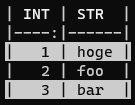
[theme] extras includes the following themes:
Make tables for specific applications
Render a table on Jupyter Notebook
All table writer class instances in pytablewriter can render in Jupyter Notebook. To render writers at notebook cells, you will require the dependency packages to be installed either by:
pip install pytablewriter[html] or
pip install pytablewriter[all]
Jupyter Notebook code examples can be found here:
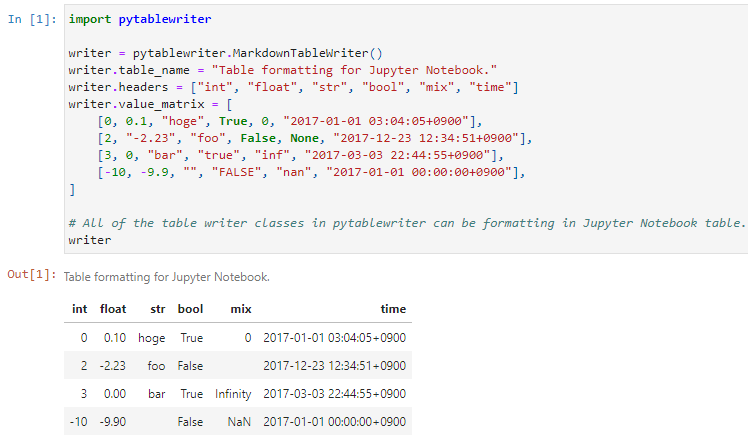
Table rendering results of Jupyter Notebook
Multibyte character support
Write a table using multibyte character
You can use multibyte characters as table data. Multibyte characters are also properly padded and aligned.
- Sample Code:
import pytablewriter as ptw def main(): writer = ptw.RstSimpleTableWriter( table_name="生成に関するパターン", headers=["パターン名", "概要", "GoF", "Code Complete[1]"], value_matrix=[ ["Abstract Factory", "関連する一連のインスタンスを状況に応じて、適切に生成する方法を提供する。", "Yes", "Yes"], ["Builder", "複合化されたインスタンスの生成過程を隠蔽する。", "Yes", "No"], ["Factory Method", "実際に生成されるインスタンスに依存しない、インスタンスの生成方法を提供する。", "Yes", "Yes"], ["Prototype", "同様のインスタンスを生成するために、原型のインスタンスを複製する。", "Yes", "No"], ["Singleton", "あるクラスについて、インスタンスが単一であることを保証する。", "Yes", "Yes"], ], ) writer.write_table() if __name__ == "__main__": main()- Output:

Output of multi-byte character table
Multiprocessing
You can increase the number of workers to process table data via max_workers attribute of a writer. The more max_workers the less processing time when tabular data is large and the execution environment has available cores.
If you increase max_workers larger than one, recommend using main guarded as follows to avoid problems caused by multi-processing:
from multiprocessing import cpu_count
import pytablewriter as ptw

def main():
    writer = ptw.MarkdownTableWriter()
    writer.max_workers = cpu_count()
    ...

if __name__ == "__main__":
    main()
For more information
More examples are available at https://pytablewriter.rtfd.io/en/latest/pages/examples/index.html
Dependencies
Optional dependencies
- logging extras
loguru: Used for logging if the package installed
- from extras
- es extra
- excel extras
- html extras
- sqlite extras
- theme extras
- toml extras
Documentation
Projects using pytablewriter
Sponsors


