tcolopy is a Python library to apply true color for terminal text.
Project Links
Meta
Author: Tsuyoshi Hombashi
Requires Python: >=3.9
Classifiers
Development Status
- 4 - Beta
Intended Audience
- Information Technology
License
- OSI Approved :: MIT License
Operating System
- OS Independent
Programming Language
- Python :: 3
- Python :: 3.9
- Python :: 3.10
- Python :: 3.11
- Python :: 3.12
- Python :: 3.13
- Python :: 3 :: Only
- Python :: Implementation :: CPython
- Python :: Implementation :: PyPy
Topic
- Software Development :: Libraries
- Software Development :: Libraries :: Python Modules
- Terminals
- Text Processing
Typing
- Typed
Summary
tcolopy is a Python library to apply true color for terminal text.







Installation
Installation: pip
pip install tcolorpy
Installation: conda
conda install -c conda-forge tcolorpy
Usage
Library usage
- Sample Code:
from tcolorpy import tcolor print(tcolor("tcolopy example", color="#ee1177", styles=["bold", "italic", "underline"]))- Output:

You can set the following tcolor arguments:
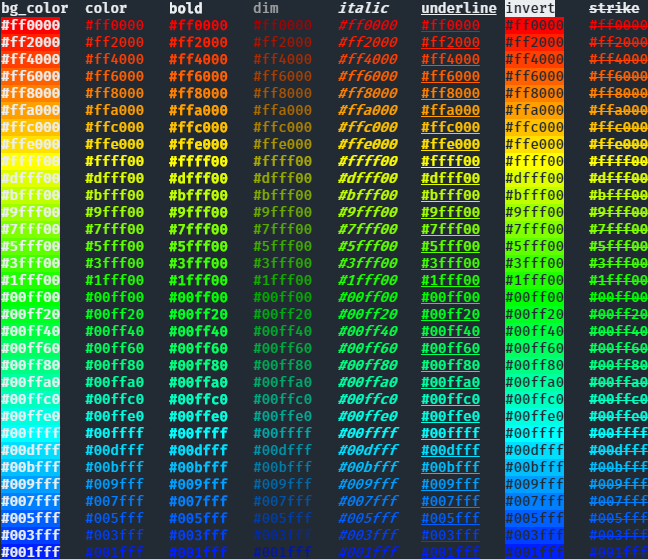
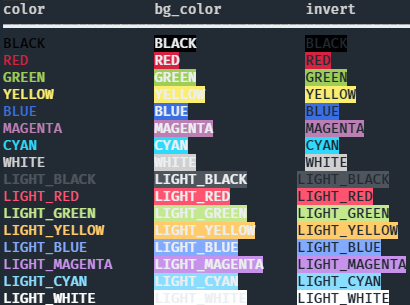
- color/bg_color
color names ("red", "green", etc.) or color code ("#RRGGBB")
- styles
"bold", "italic", etc.
Other examples
Apply true color and styles to text:
You can also specify colors by name:
CLI usage
tcolorpy can be used via CLI:
$ python3 -m tcolorpy "tcolopy example" -c "#ee1177" -s bold,italic,underline
Command help
usage: __main__.py [-h] [-c COLOR] [-b BG_COLOR] [-s STYLES] [--encode ENCODE] string

positional arguments:
  string                string to apply styles.

options:
  -h, --help            show this help message and exit
  -c COLOR, --color COLOR
                        specify a color code (#XXXXXX) or a name. valid names are: black, red, green, yellow, blue, magenta, cyan, white, lightblack, lightred, lightgreen, lightyellow, lightblue, lightmagenta, lightcyan, lightwhite
  -b BG_COLOR, --bg-color BG_COLOR
                        specify a background color code (#XXXXXX) or a name. valid names are: black, red, green, yellow, blue, magenta, cyan, white, lightblack, lightred, lightgreen, lightyellow, lightblue, lightmagenta, lightcyan, lightwhite
  -s STYLES, --styles STYLES
                        specify a comma-separated style. valid values are: bold, dim, italic, underline, blink, invert, strike
  --encode ENCODE       output a text encoded with the specified encoding
Dependencies
Python 3.9+ no external dependencies.
0.1.7
Dec 29, 2024
0.1.6
Apr 27, 2024
0.1.4
Sep 16, 2023
0.1.3
May 05, 2023
0.1.2
Feb 26, 2022
0.1.1
Jun 16, 2021
0.1.0
Jun 12, 2021
0.0.9
Mar 27, 2021
0.0.8
Aug 14, 2020
0.0.7
Aug 08, 2020
0.0.6
Aug 05, 2020
0.0.5
May 30, 2020
0.0.4
May 11, 2020
0.0.3
Apr 30, 2020
0.0.2
Apr 29, 2020
0.0.1
Apr 28, 2020
