Development Status
- 5 - Production/Stable
Framework
- Sphinx
- Sphinx :: Extension
Intended Audience
- Developers
Operating System
- OS Independent
Programming Language
- Python
- Python :: 3 :: Only
- Python :: 3.12
- Python :: 3.13
- Python :: 3.14
- Python :: 3.15
Topic
- Documentation
- Documentation :: Sphinx
- Software Development :: Documentation
Typing
- Typed

sphinx-autodoc-typehints



This Sphinx extension reads the
type hints of the code autodoc documents and writes them into the
parameter and return fields, so you state each type once, in the code. It links every part of a type to its
documentation, and resolves names your code imports only for type checkers (inside an if TYPE_CHECKING: block) or
declares in .pyi stub files. It also documents @overload variants and default values, and types Google and NumPy
style docstrings written for napoleon or numpydoc.
pip install sphinx-autodoc-typehints
# conf.py: load autodoc first, then this extension
extensions = ["sphinx.ext.autodoc", "sphinx_autodoc_typehints"]
Why not Sphinx's built-in autodoc_typehints?
Sphinx's
autodoc_typehints = "description"
already moves annotations into the parameter and return fields, links them, and works with napoleon docstrings and type
comments. If your annotations resolve at runtime and you use Sphinx fields or napoleon, that setting may be enough.
Show example code and configuration
The same demo.py below renders differently with each option. It uses typing-extensions for Doc. Both builds use
.. automodule:: demo with :members:. The left adds typehints_defaults = "braces" and
always_document_param_types = True to the configuration above; the right loads only sphinx.ext.autodoc with
autodoc_typehints = "description".
from __future__ import annotations

from typing import Annotated, Literal, NotRequired, TypedDict, Unpack, overload

from typing_extensions import Doc


class Options(TypedDict):
    """Optional controls for a request."""

    retries: NotRequired[int]
    trace: NotRequired[bool]


@overload
def fetch(path: str, *, mode: Literal["text"], **options: Unpack[Options]) -> str: ...


@overload
def fetch(path: str, *, mode: Literal["bytes"], **options: Unpack[Options]) -> bytes: ...


def fetch(
    path: Annotated[str, Doc("resource path")],
    *,
    mode: Literal["text", "bytes"] = "text",
    **options: Unpack[Options],
) -> str | bytes:
    """Fetch a resource.

    :keyword retries: attempts after a failure
    :keyword trace: log each request
    """
    return "" if mode == "text" else b""
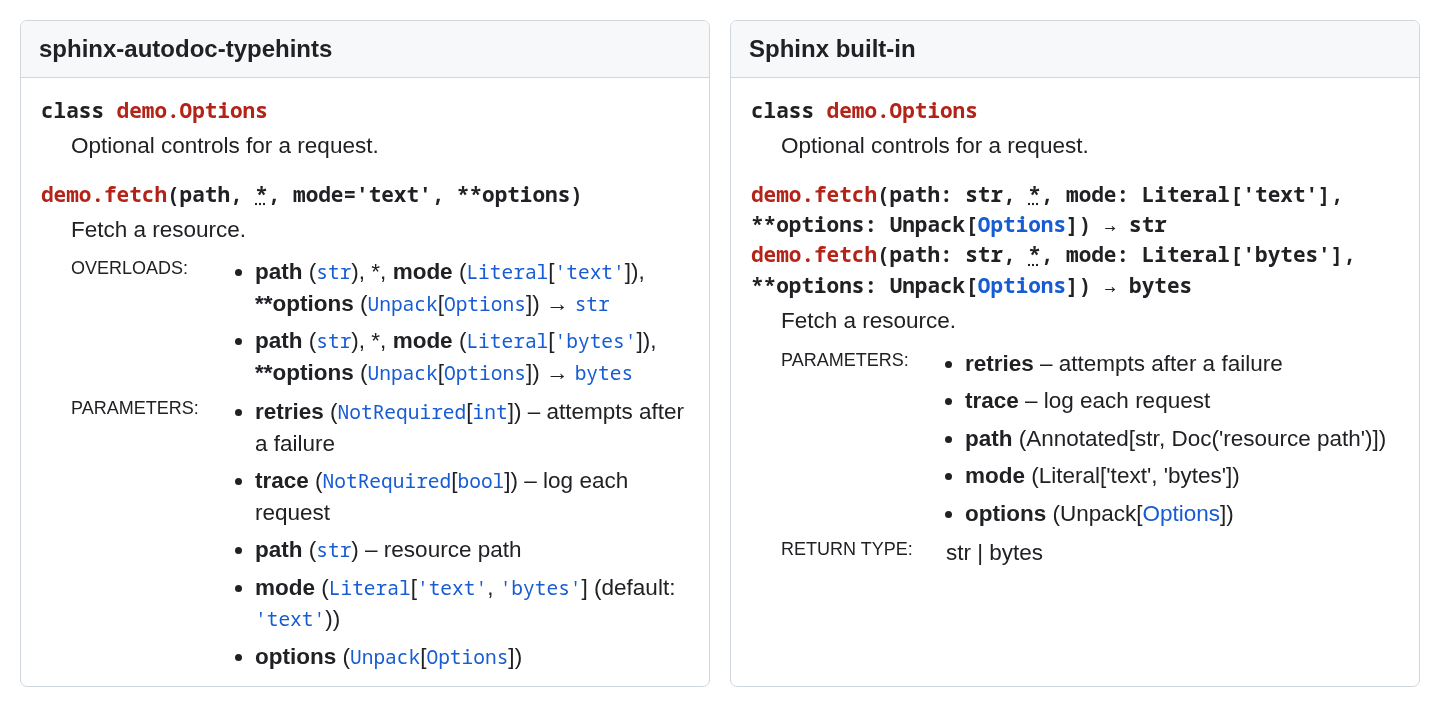
The live TypedDict example lets you change the configuration and inspect its output. See the examples for each difference:
- Names imported under
if TYPE_CHECKING:link to their real module (decimal.Decimal, not a bareDecimal). - Types from
.pyistubs fill in functions that carry no annotations, such as those of a C extension. **kwargs: Unpack[TypedDict]gets keyword fields typed from theTypedDictentries.Annotated[..., Doc(...)]puts descriptions from annotations into the parameter fields.- numpydoc
Parameterssections get types in place, rather than in a second list. @overloadvariants get anOverloadsfield, and default values appear next to the types.@deprecatednotices,@overridelinks, and property setter types add details beyond parameter types.
The full comparison lists the differences, and the live examples show each module rendered both ways.
The typing features gallery shows source and rendered output for each construct. The documentation also has a tutorial, how-to guides and the option reference; CONTRIBUTING.md explains how to work on the extension.
