A collection of Matplotlib colormaps from the yt project
Project Links
Meta
Author: The yt project
Requires Python: >=3.10
Classifiers
Development Status
- 5 - Production/Stable
Framework
- Matplotlib
Intended Audience
- Science/Research
License
- OSI Approved :: BSD License
Operating System
- MacOS :: MacOS X
- POSIX :: AIX
- POSIX :: Linux
Programming Language
- Python :: 3
Topic
- Scientific/Engineering :: Visualization
Typing
- Typed
cmyt







Matplotlib colormaps from the yt project !
Colormaps overview
The following colormaps, as well as their respective reversed (*_r) versions are available
Perceptually uniform sequential colormaps
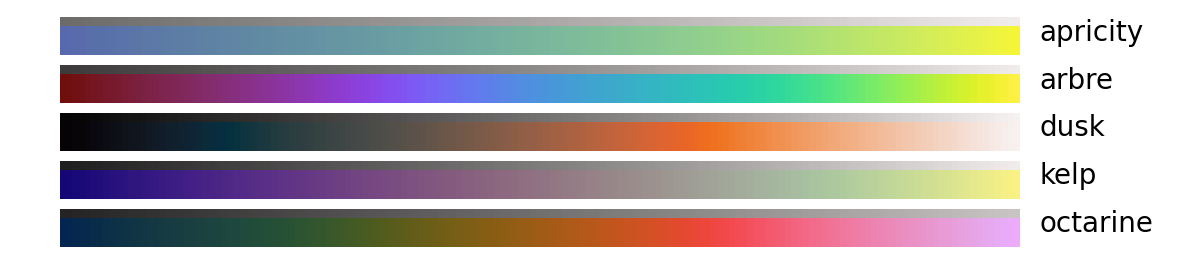
Monochromatic sequential colormaps

Miscellaneous

Installation
with pip
python -m pip install cmyt
or with conda
conda install -c conda-forge cmyt
Usage
cmyt integrates with matplotlib in a similar fashion to cmocean or cmasher
import numpy as np
import matplotlib.pyplot as plt
import cmyt  # that's it !

# generate example data
prng = np.random.RandomState(0x4D3D3D3)
noise = prng.random_sample((100, 100))
x, y = np.mgrid[-50:50, -50:50]
z = 5 * np.exp(-(x**2 + y**2) / 1000)

# setup the figure
fig, ax = plt.subplots()
ax.set(aspect="equal")

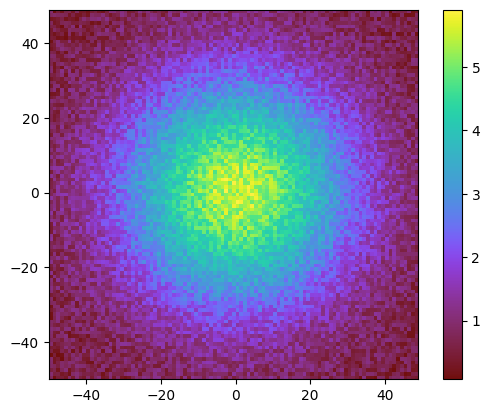
# now we can refer to cmyt colormaps as strings
im = ax.pcolormesh(x, y, z + noise, cmap="cmyt.arbre", shading="flat")
fig.colorbar(im, ax=ax)
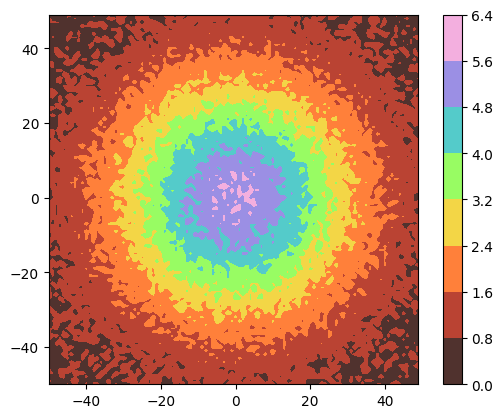
# alternatively, cmyt maps can also be imported as objects
from cmyt import pastel

fig, ax = plt.subplots()
ax.set(aspect="equal")
im = ax.contourf(x, y, z + noise, cmap=pastel)
fig.colorbar(im, ax=ax)
A gallery of comparable examples using all colormaps from cmyt is available in the test directory.
2.0.2
Jan 23, 2025
2.0.1
Nov 26, 2024
2.0.0
Oct 04, 2023
1.4.0
Sep 17, 2023
1.3.1
Aug 12, 2023
1.3.0
Jun 25, 2023
1.2.1
Jun 19, 2023
1.2.0
Apr 16, 2023
1.1.3
Dec 24, 2022
1.1.2
Jul 22, 2022
1.1.1
Jul 16, 2022
1.1.0
Jul 16, 2022
1.0.4
Dec 29, 2021
1.0.3
Nov 30, 2021
1.0.2
Nov 11, 2021
1.0.1.post1
Nov 02, 2021
1.0.1
Nov 02, 2021
1.0.0
Nov 01, 2021
0.2.2
Oct 18, 2021
0.2.1
Oct 06, 2021
0.2.0
Aug 26, 2021
0.1.1
Jul 16, 2021
