Intended Audience
- Developers
Natural Language
- English
Development Status
- 5 - Production/Stable
Environment
- Console
- Console :: Curses
Operating System
- POSIX
- Microsoft :: Windows
Programming Language
- Python :: 3
- Python :: 3.9
- Python :: 3.10
- Python :: 3.11
- Python :: 3.12
- Python :: 3.13
- Python :: 3.14
- Python :: 3.15
Topic
- Software Development :: Libraries
- Software Development :: User Interfaces
- Terminals
Typing
- Typed


Introduction
Blessed is an easy, practical library for making terminal apps, by providing an elegant, well-documented interface to Colors, Keyboard input, and screen position and Location capabilities.
from blessed import Terminal

term = Terminal()

print(term.home + term.clear + term.move_y(term.height // 2))
print(term.black_on_darkkhaki(term.center('press any key to continue.')))

with term.cbreak(), term.hidden_cursor():
    inp = term.inkey()

print(term.move_down(2) + 'You pressed ' + term.bold(repr(inp)))
It’s meant to be fun and easy, to do basic terminal graphics and styling with Python using blessed. Terminal is the only class you need to import and the only object you should need for Terminal capabilities.
Whether you want to improve CLI apps with colors, or make fullscreen applications or games, blessed should help get you started quickly. Your users will love it because it works on Windows, Mac, and Linux, and you will love it because it has plenty of documentation and examples!
Full documentation at https://blessed.readthedocs.io/en/latest/
Examples

x11-colorpicker.py, bounce.py, worms.py, and plasma.py demonstration programs from our repository.
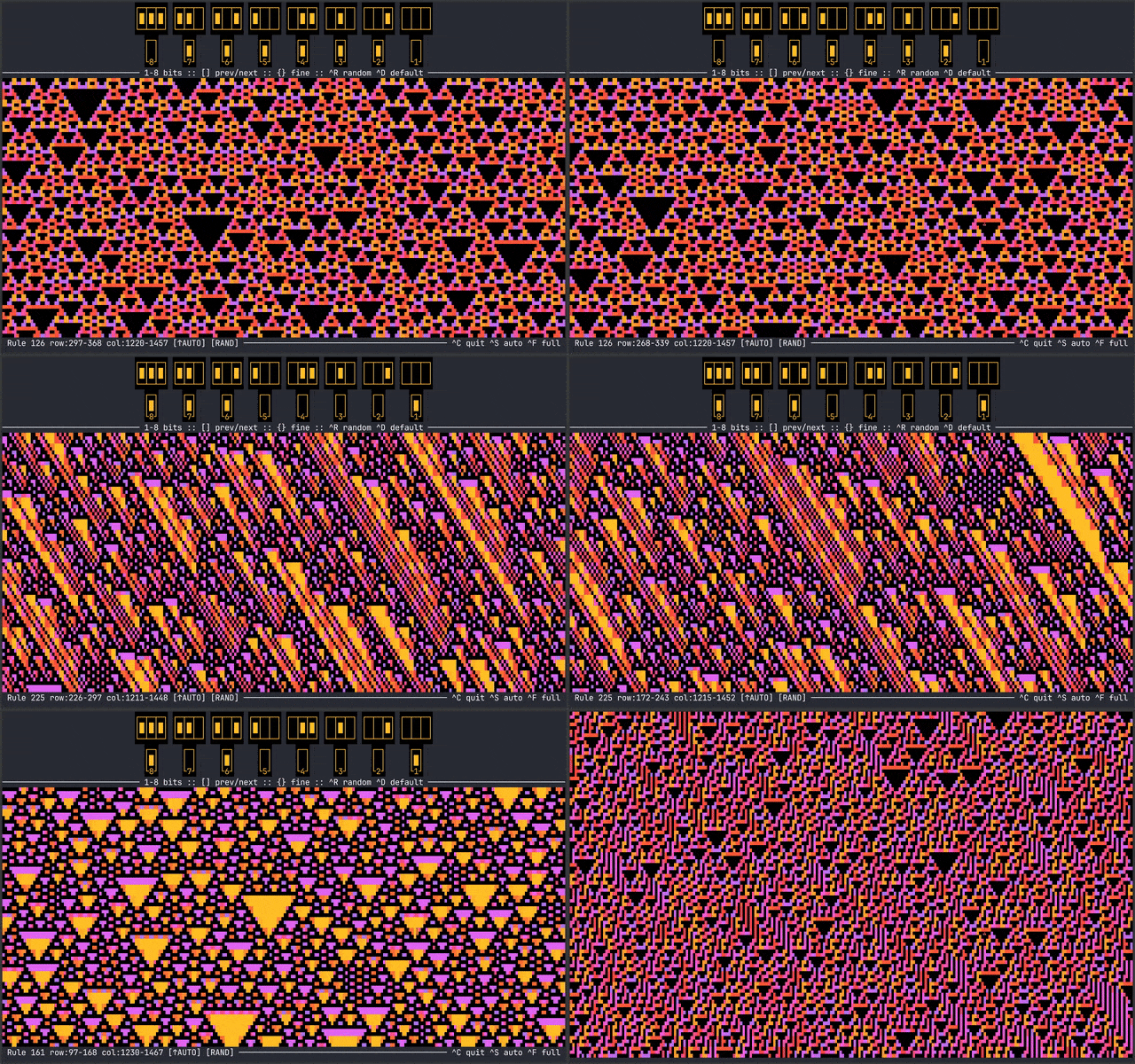
cellestial.py demonstration program from our repository.
Exemplary 3rd-party examples which use blessed,

Voltron is an extensible debugger UI toolkit written in Python

cursewords is “graphical” command line program for solving crossword puzzles in the terminal.

Dashing is a library to quickly create terminal-based dashboards.

Enlighten is a console progress bar library that allows simultaneous output without redirection.
Requirements
Blessed works with Windows, Mac, Linux, and BSD’s, on Python 3.9+.
Brief Overview
Blessed is more than just a Python wrapper around curses:
Styles, Colors, and maybe a little positioning without necessarily clearing the whole screen first.
Works great with Python’s new f-strings or any other kind of string formatting.
Provides up-to-the-moment Location and terminal height and width, so you can respond to terminal size changes.
Avoids making a mess if the output gets piped to a non-terminal, you can output sequences to any file-like object such as StringIO, files, pipes or sockets.
Uses terminfo(5) so it works with any terminal type and capability: No more C-like calls to tigetstr and tparm.
Non-obtrusive calls to only the capabilities database ensures that you are free to mix and match with calls to any other curses application code or library you like.
Provides context managers Terminal.fullscreen() and Terminal.hidden_cursor() to safely express terminal modes, curses development will no longer fudge up your shell.
Act intelligently when somebody redirects your output to a file, omitting all of the special sequences colors, but still containing all of the text.
Blessed is a fork of blessings, which does all of the same above with the same API, as well as following enhancements:
Windows support, new since Dec. 2019!
Dead-simple keyboard handling: safely decoding unicode input in your system’s preferred locale and supports application/arrow keys.
24-bit color support, using Terminal.color_rgb() and Terminal.on_color_rgb() and all X11 Colors by name, and not by number.
Determine cursor location using Terminal.get_location(), enter key-at-a-time input mode using Terminal.cbreak() or Terminal.raw() context managers, and read timed key presses using Terminal.inkey().
Allows the printable length of strings that contain sequences to be determined by Terminal.length(), supporting additional methods Terminal.wrap() and Terminal.center(), terminal-aware variants of the built-in function textwrap.wrap() and method str.center(), respectively.
Allows sequences to be removed from strings that contain them, using Terminal.strip_seqs() or sequences and whitespace using Terminal.strip().
Per-character text sizing using the kitty text sizing protocol, via Terminal.text_sized() and Terminal.does_text_sizing().
Before And After
With the built-in curses module, this is how you would typically print some underlined text at the bottom of the screen:
from curses import tigetstr, setupterm, tparm
from fcntl import ioctl
from os import isatty
import struct
import sys
from termios import TIOCGWINSZ

# If we want to tolerate having our output piped to other commands or
# files without crashing, we need to do all this branching:
if hasattr(sys.stdout, 'fileno') and isatty(sys.stdout.fileno()):
    setupterm()
    sc = tigetstr('sc')
    cup = tigetstr('cup')
    rc = tigetstr('rc')
    underline = tigetstr('smul')
    normal = tigetstr('sgr0')
else:
    sc = cup = rc = underline = normal = ''

# Save cursor position.
print(sc)

if cup:
    # tigetnum('lines') doesn't always update promptly, hence this:
    height = struct.unpack('hhhh', ioctl(0, TIOCGWINSZ, '\000' * 8))[0]

    # Move cursor to bottom.
    print(tparm(cup, height - 1, 0))

print(f'This is {underline}underlined{normal}!')

# Restore cursor position.
print(rc)
The same program with Blessed is simply:
from blessed import Terminal

term = Terminal()
with term.location(0, term.height - 1):
    print('This is ' + term.underline('underlined') + '!', end='')